Owner · 3 min read
Your trial and your plan
What you'll get
Where to see days left, what happens on day 60, how to talk to us, and how paying by UPI or bank transfer works.
Before you start
- Owner sign-in on the web.
- Who
- Owner
- Read time
- 3 minutes
Step 1: See your days left
Open Workspace › Billing & plan. The trial panel reads 'Free trial · n days left'. You're on full Growth-plan limits: 20 seats and 25,000 new leads a month. There's no card on file and no automatic charge. The top bar shows the same countdown as a chip.
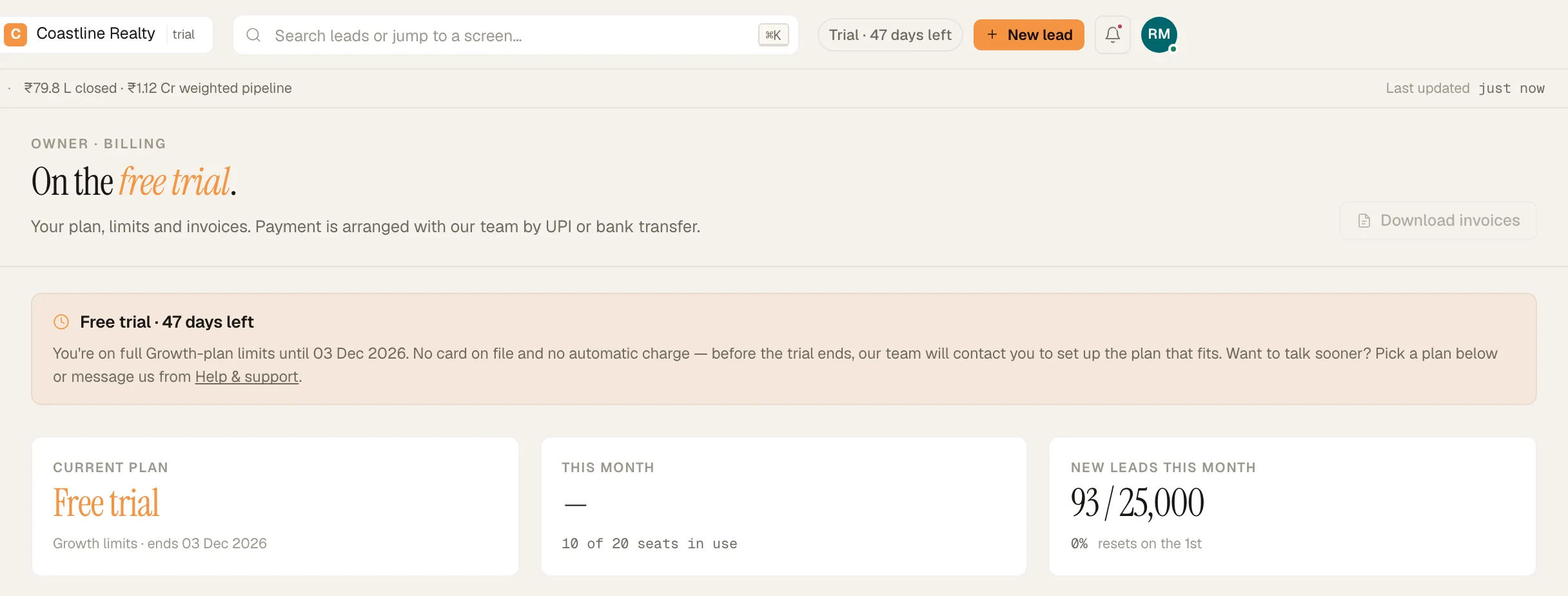
Billing & plan during the free trial. Demo workspace. Step 2: Talk to us sooner
Click 'Talk to us about this plan' on any plan card. It opens a ticket in Workspace › Help & support. A person reads it, and the reply lands in the app and in your email.
Step 3: What happens on day 60
Nothing switches off on day 60. Our team will contact you to set up your plan, and you can export your data at any time. Ten days before the end, you'll get a notice titled '10 days left in your trial', in the app and by email.
Step 4: Paying for your plan
Payment is arranged with our team by UPI, NEFT/IMPS or bank transfer. The 'UPI · bank transfer' pill on the page is the reminder. Invoices appear on Workspace › Billing & plan, and 'Download invoices' saves them as a CSV.
If something's off
The trial date has passed. Is anything locked?
No. The panel reads that your trial ended, and that nothing has stopped working. Our team will contact you to set up your plan.
Who sets up seat or plan changes?
Our team does. Use 'Talk to us about this plan', or message us from Workspace › Help & support.
Try GrowthForceOS
Trying GrowthForceOS? 60 days free, no card.
No card · 20 seats · 25,000 leads a month · Nothing switches off on day 60